
ACNH Order Bot Command Builder Tweaks: Never See a Sleeping Villager Again!
I’ve been quietly working behind the scenes on some improvements on the order bot command builder tool.
If you haven’t tried this tool yet, you can browse and explore Animal Crossing New Horizons items by category, by theme, by series, by interactivity, by colour, or by name! You can add up to 40 items to your virtual pockets, add a villager if you like, then click the shopping cart to grab your order bot command. You would then copy your order bot command and paste it into an ACNH order bot like Pangazon. My order bot is available to subscribed Pange Plays Treasure Islands members.
What’s New In July 2026?
Update 1: Sleeping Improvements: Say goodbye to locked villager doors!
Did you know that each villager in Animal Crossing New Horizons has their own sleeping schedule? They deserve their beauty sleep! However, this can cause trouble when you’re requesting a villager, since if they are asleep, their door will be locked and you won’t be able to talk to them. The key is to know where the villager would be awake.
- Cranky villagers should be awake from 9:00am to 3:30am.
- Jock villagers should be awake from 6:30am to 12:30am.
- Lazy villagers should be awake from 8:00am to 11:00pm.
- Normal villagers should be awake from 6:00am to 12:00am.
- Peppy villagers should be awake from 7:00am to 1:20am.
- Sisterly villagers should be awake from 9:30am to 3:00am.
- Smug villagers should be awake from 7:00am to 2:00am.
- Snooty villagers should be awake from 8:30am to 2:30am.
When you add a villager to your pockets on the ACNH Order Bot Command Builder Tool, you’ll now get a suggestion of which order bot island you should pick where the villager will most likely be awake. Here is an example of how this works!
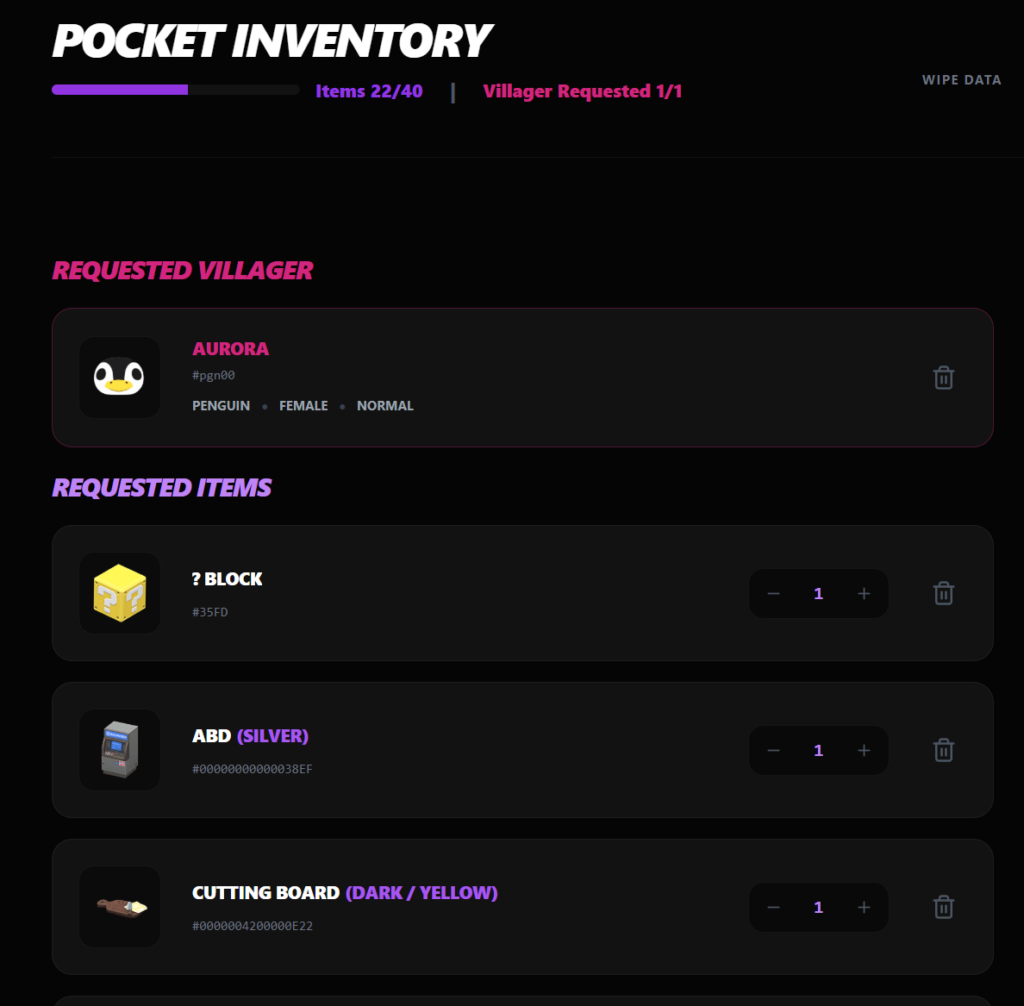
Example: Sample Order Pocket Inventory Screen
Here, I’ve created a sample order with an assortment of items and a villager, Aurora! She is a Normal type villager.
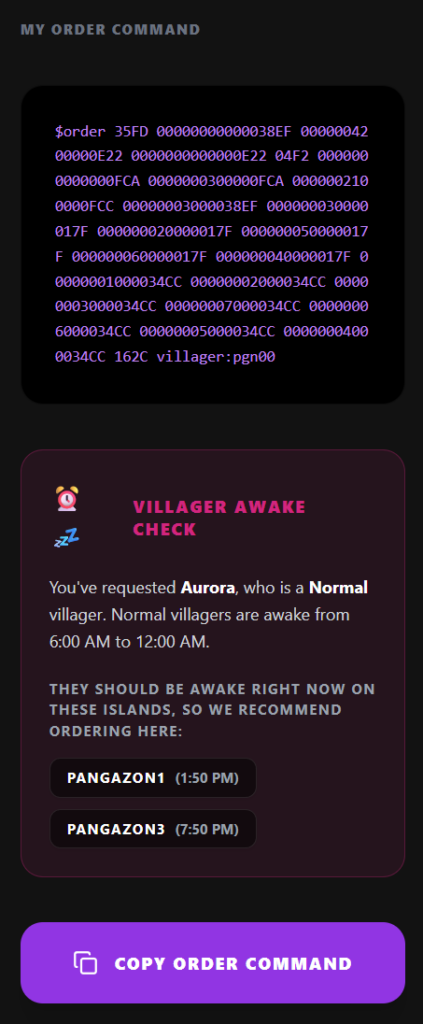
In the side bar, it shows the order bot command that you need to submit to one of the order bot. After your command, it will show a summary. In this case, I’ve requested Aurora, who is a Normal villager. Normal villagers are awake from 6:00 AM to 12:00 AM. At the time I created this order, she is expected to be awake right now on these islands:
- Pangazon1 (currently 1:50 PM)
- Pangazon3 (currently 7:50 PM)
On Pangazon 2, since it would be currently 1:50 AM, the website won’t recommend you use that option. Here is how that message looks on the updated tool:
One of the most common questions I receive is why is my villager asleep, so I hope this will help you all find the perfect island where your villager will be awake and ready to adopt in boxes.
Update 2: Starting Over Popup Improvements
This update is a minor change, but for those of you with big orders, it will be an appreciated one! Previously, the popup for the WIPE DATA button to start a new order popped up in the middle of your order screen. If you only had a few items, no biggie, but if you had a 40 unique item order, you had to scroll and scroll and scroll to get down to the confirmation popup. I’ve changed the relative positioning of the popup to be closer to the top instead of centered so this unnecessary scrolling is a thing of the past!

I hope these quality-of-life tweaks make planning your next island design or villager lineup just a little bit smoother. My community’s feedback has always been the driving force behind these updates, so if you run into any hiccups or have ideas for what you’d like to see next, please let me know. You can report any issues with the order bot in a #help ticket on my Discord server!